Turn Claude Code or Codex into a Forward Deployed Engineer
Claude Code or Codex moves into the business, spots the work your team still does by hand, then builds and ships the fix.
Sign upFree · needs Claude Code or Codex
What FDE App does
FDE App works inside Claude Code or Codex. You talk to it about a company (your own or a client's) and give it what you already have: conversations, documents, system data, recordings of the work. It documents how the company really runs, finds where work waits, loops, or depends on one person, designs what to change step by step, and works out what each change is worth. Everything it writes is a plain document you can read, correct, and share with your team or client.
Sign upFree · needs Claude Code or Codex
What you get
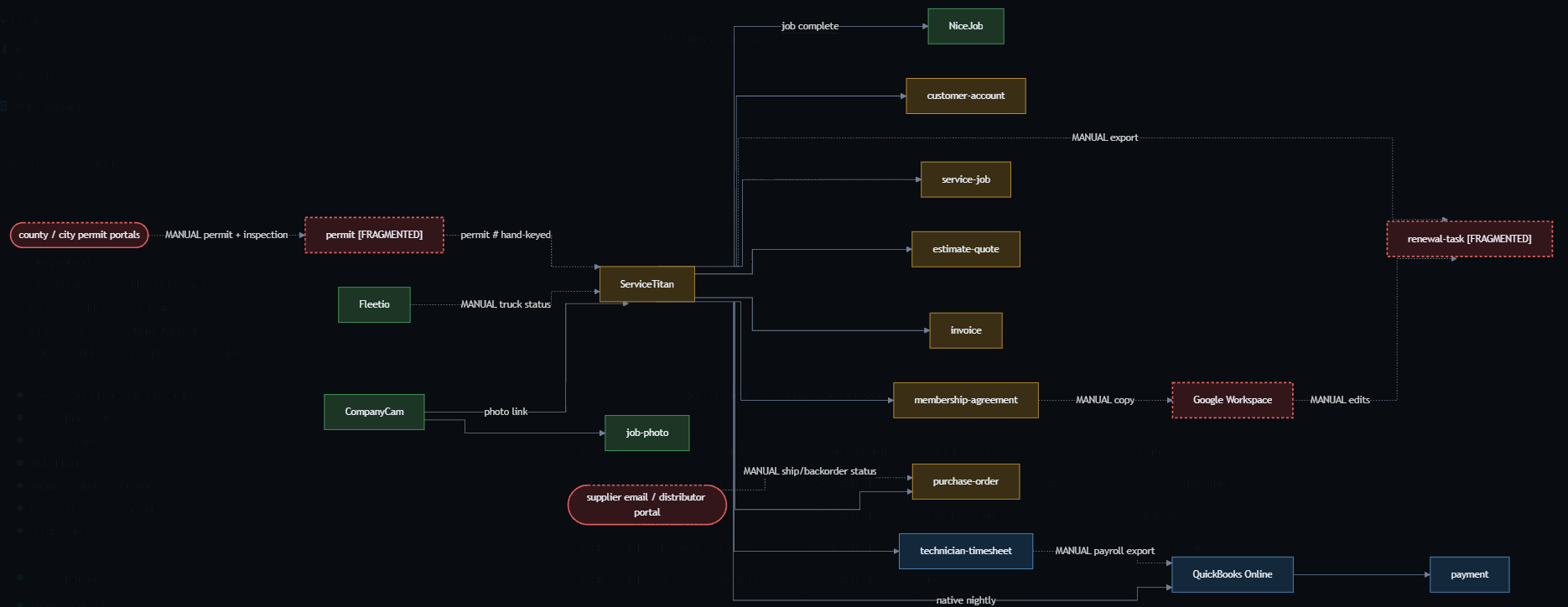
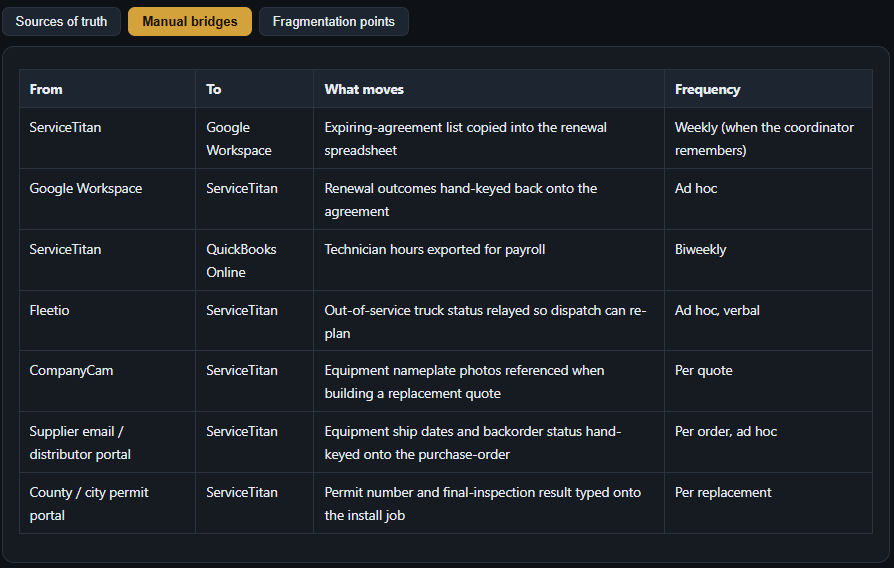
How the work runs
Learn the work
- Get to know the company
- Map how the work really runs
- Measure it
Choose the fix
- Find what matters most
- Decide what to change
- Make the case
Ship it
- Get it built and adopted
- Prove it
Who's behind it
I'm Michael Greenberg (@gentoftech). For almost four years, 3rd Brain has worked with 50+ client companies on their operations. FDE App follows the method in my book, the Digital Operations Playbook, free at digitaloperationsinstitute.com/book.
FDE App is new: expect rough edges, and tell us what gets in your way.
Create your account
Sign upAlready have an account? Sign in
- Choose Sign up, enter your name and email, and type the six-digit code we email you. There is no password.
- You land back here, with a workspace of your own.
Creating your account means you accept the Terms of Use and the Privacy Policy.
Install FDE App
FDE App runs in your own Claude Code or Codex as a plugin. Sign up, and your one-step install appears here.
Your first conversation
Start a new session in Claude Code or Codex and say:
I'm new to FDE App. Help me get started with my company.FDE App asks whether you are working on your own company or a client's, sets up the company in your workspace, and asks what you can share first. Give it whatever you have and it gets to work right away; you don't need to prepare anything.
What to share first
In rough order of how much each one helps:
- A few sentences about the business and the one result you want from this work. This becomes the company profile.
- A transcript of a conversation with the owner or with the person who runs a workflow, for example from Fireflies, Zoom, or Google Meet. This is the fastest way to map how the work really happens.
- Documents you already have: SOPs, checklists, training or onboarding guides.
- An export from the system the work lives in, such as your CRM, ticketing, or project tool. Ask FDE App how to share it; from real data FDE App measures how long work takes, where it waits, and where it loops.
- A screen recording of someone doing a task, made with their knowledge. Upload it from your company's page in the web app.
Paste text or attach files straight into the chat. FDE App saves what you share in your company's library and cites it in everything it writes.
The web app
The work happens in Claude Code or Codex. This site is for files, recordings, and reading:
- Your companies and their documents.
- Uploading a recording of the work, from a company's page.
- Downloading a company's whole library as a zip file, any time.
- Opening a library in Navigator, a read-only view with its workflow maps and dashboard.
Help and what's next
At any point, ask:
- "Help" or "What can FDE App do?" for a short menu with examples.
- "What's next?" for the next step for your company, from what its library already holds.
If an FDE App tool is missing: in Claude Code, type /mcp, choose fde-app, and sign in with the same email as here; in Codex, run codex mcp login fde-app.
Before you start
- FDE App has a free plan that documents and maps a company, and a paid plan per company for everything else; it's new, so expect rough edges, changes, and the occasional bug, and download your library if you want your own copy.
- FDE App writes drafts. Check what it produces before you rely on it or hand it to a client.
- You own your company data. We don't sell it or use it to train AI models, and you can delete a company or your account at any time. We may use de-identified patterns across many companies to improve FDE App; they never identify you or your company.
- Only share data you are allowed to share, and only record people who know they are being recorded.
Questions or feedback: michael@3rdbrain.co. Bugs, confusing moments, and ideas are all welcome; that feedback is how FDE App gets better.